Circle Pick Tool in the Risk Manager
Risk-based gas mapping requires defining leak scenarios at credible release locations across a facility. For equipment such as vessels, separators, pumps, and flanges, the realistic representation of a leak is not a single point release but a distribution of possible release directions around the equipment - a leak could occur from any side of a flange, in any direction. Defining each of those release directions individually is repetitive and error-prone. As of version 4.1, the Circle Pick Tool automates this, allowing the user to select a circular CAD item and have a distributed set of inflows automatically defined around it.
Where to Find the Tool
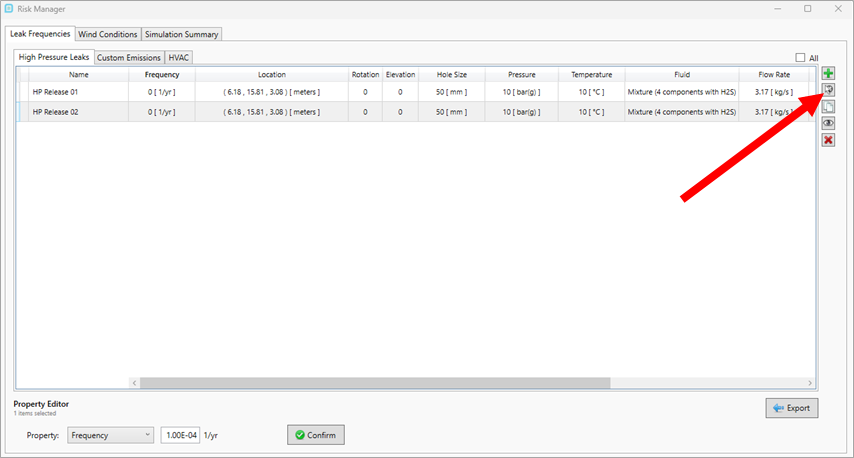
The Circle Pick Tool is accessed from the Risk Manager, on the Leak Frequencies tab. The icon has no text label but is indicated below. Hovering over it shows the tooltip Add Circular Group. Click the icon  to launch the tool's pick mode.
How to Use the Tool
-
With the Circle Pick Tool active (see "Where to Find the Tool" above), click on a circular region of the CAD geometry in the 3D window — typically a flange or valve.
-
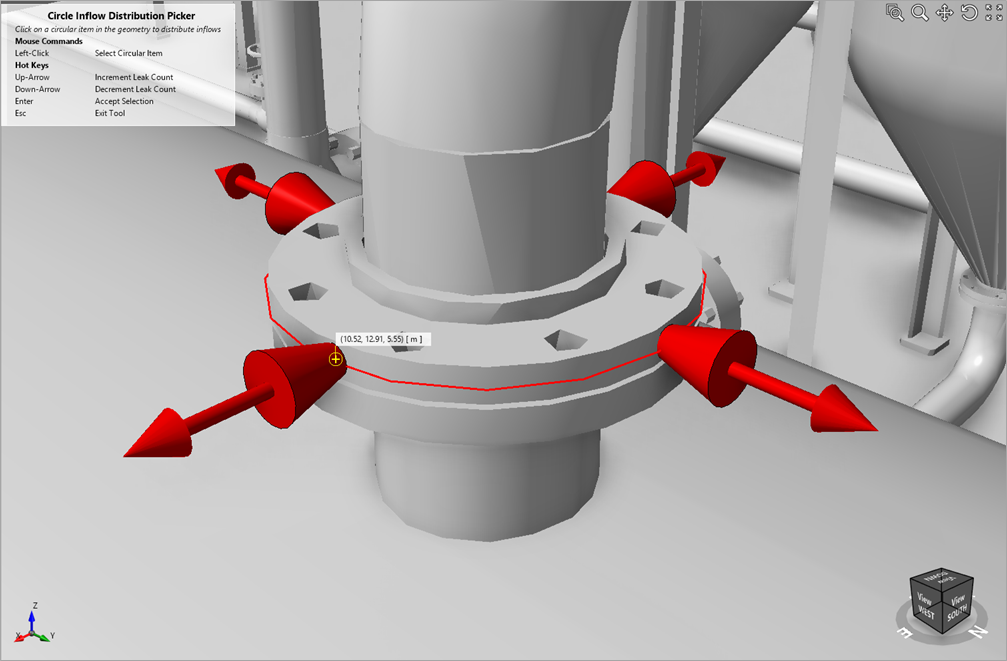
The tool generates a series of leak inflow arrows distributed evenly around the selected circular region (shown below). Each arrow represents one credible release direction.
-
Use the Up and Down arrow keys to increment or decrement the number of leaks in the distribution, Enter to accept the selection, and Esc to exit without adding.
Scope and Limitations
-
The tool requires the CAD region selected to be approximately circular. For non-circular geometries, define leaks individually.
-
The leaks are distributed evenly around the circle. If other positions are needed, try re-selecting the primary point to reposition, or return to the manual method of defining leaks.
-
Use additional manual leaks to represent any preferred direction with higher frequency, or split into multiple equipment items with weighted frequencies if direction-specific frequencies are needed.
-
Each generated leak is a distinct simulation case in the risk data set. Take caution adding higher distribution counts as it will result in more simulations and longer computation times.
See also: Tutorial 11 - Risk-Based Simulations, Tutorial 12 - Risk-Based Gas Mapping, Using Inflow Templates and the Auto-Add Tool.