Initial Gas Cloud for Dispersion Simulations
By default, a dispersion simulation starts with the domain filled with air at ambient conditions and the gas only enters through the inflow. In some cases this is not the right starting point - the analysis may need to begin with a gas cloud already present in part of the domain. Examples include studying the washout of an existing accumulation under varying ventilation conditions, modeling a leak that began before instrumentation could detect it, or assessing the effect of an ignition source on a pre-existing cloud. As of version 4.0, in:Flux supports defining an initial gas cloud as part of the dispersion simulation setup.
How to Define an Initial Gas Cloud
-
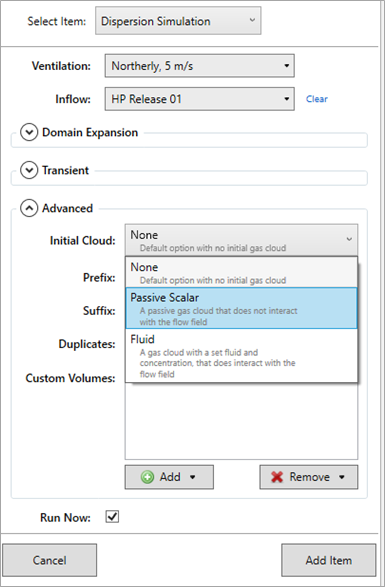
When setting up a dispersion simulation, expand the Advanced options.
-
Set Initial Cloud (the default is no initial cloud). There are two options:
-
Fluid — a gas cloud that interacts with the flow field. Select the Cloud Fluid from the DIPPR® fluids database and enter its concentration in the chosen units (%vol or ppm). The cloud fluid does not have to be the same as the inflow fluid.
-
Passive Scalar — a passive gas cloud that does not interact with the flow field. Use it to track how a volume of gas is transported by the ventilation without it influencing the flow.
-
-
Choose the Cloud Size, which applies to either option:
-
Whole Domain — the cloud fills the entire simulation domain.
-
Defined Box — the cloud occupies a cuboid volume. The box is positioned the same way as a monitor region: two opposing corner points, either picked in the 3D window with the Pick Tool or entered as coordinates.
-
Once the simulation is added to the project, the initial cloud can be reviewed via the simulation's property grid.
Once the simulation is added to the project, the initial cloud can be reviewed via the simulation's property grid.
When to Use This Option
-
Pre-existing accumulation analysis - to model scenarios where a gas accumulation has built up over time before the analysis window of interest begins (for example, a slow leak detected late, or a leak in an enclosed space that ran prior to ESD).
-
Linking indoor and outdoor simulations - results from an indoor dispersion can establish the initial cloud for an outdoor dispersion at the moment gas exits an HVAC outlet or vent.
-
Sensitivity studies - to test how the presence of background gas affects the development of a new release, useful in scenarios where one credible event is the consequence of another.
-
Ventilation washout studies - to evaluate how quickly an existing gas cloud is cleared from a space by a given ventilation arrangement, define the initial cloud at the concentration of concern, set no inflow (or a very small one), and run a transient simulation.
Scope and Limitations
-
The initial cloud is uniform within the defined box. For more complex initial conditions, multiple inflows can be staged via transient profiles instead.
-
The cloud interacts with the flow field from the start of the simulation. A reasonable ventilation simulation must therefore be available as the basis for the dispersion run, or the initial cloud will not disperse realistically.
-
For steady-state simulations the initial cloud is the starting point of the iterative solver and may converge away from the initial state. For transient analysis it represents the physical condition at t = 0.
See also: Tutorial 2 - Dispersion Simulation, Tutorial 8 - Transient Simulations,