Transient Risk-Based Analysis
Risk-Based analysis, such as Risk-Based Gas Mapping, can be performed using transient dispersion cases as well as steady-state ones. Follow the guidance below to set up this project type, as it differs from the Tutorial 11 example, which uses steady-state dispersions throughout.
When a Transient Analysis is Needed
Risk-Based Gas Mapping is normally performed on steady-state dispersions, and this remains the recommended default. A steady-state simulation assumes unlimited inventory and has no concept of time, so it produces the fully-developed gas cloud. For a fixed-rate release the flammable envelope generally reaches its largest extent at steady state, which means a detector that is not reached by the steady-state cloud would not have been reached at any earlier moment either. The coverage figure that results answers the question is the release detected.
A transient analysis answers a different and stricter question: is the release detected within a given time. It is worth the additional setup and computation in four situations.
-
A required detection time. Some end users specify that gas must be detected within a set number of seconds. Steady-state results cannot demonstrate this, because they contain no time information.
-
Inventory-limited releases. Where the inventory is small or the blowdown fast, the release may stop before a steady cloud can form. A steady-state simulation would overstate the cloud, and therefore overstate coverage. See Tutorial 08.
-
Liquid spills and pool evaporation. A pool spreads and evaporates over minutes rather than seconds, so cloud size is a function of how long the spill goes unnoticed. A transient run is used to establish how large the cloud becomes in the time available.
-
Enclosed and HVAC-dominated spaces. In a large enclosure the gas accumulates rather than dispersing to a stable plume, and the build-up time is the design question rather than the cloud geometry.
Because a transient analysis tests a stricter condition, the coverage or risk reduction reported for a given layout will normally be lower than the steady-state figure for the same layout. The optimized layout will also differ, as the optimization now rewards detectors that see the cloud early rather than detectors that see it eventually.
Setting up the Simulations
-
Define leaks, leak frequencies and the wind rose in the Risk Manager exactly as for a steady-state study. Nothing about scenario selection, leak frequency or wind rose definition changes.
-
Set the dispersion cases to run as transient simulations, entering a Duration long enough to cover the time of interest with margin. This can be done in the Simulation Summary tab of the risk manager.
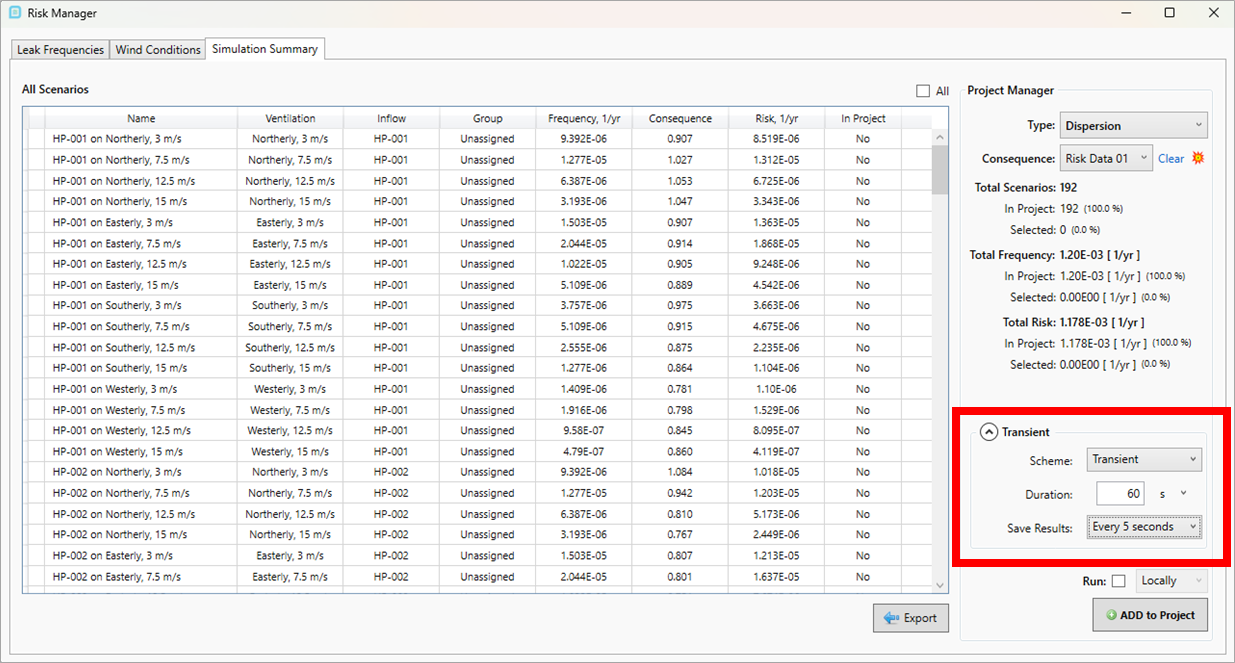
Simulation Summary tab of risk manager indicating location for setting transient properties for the simulations to be run
-
If the study is to represent a real shutdown response, add the shutdown time (ESD) and, where relevant, depressurization and blowdown to the inflow definition.
Note that the shutdown is normally initiated by gas detection. The analysis should therefore be evaluated at a time before the shutdown takes effect. Sampling after that point would report a cloud that is already collapsing because of the very detection the study is trying to assess.
-
Choose the interval at which each simulation saves its results. Results can be saved at everytime step (longest to calculate), 1, 2, 5, 10, 30 or 60 second intervals, and this interval sets how precisely the time of interest can be resolved.
Transient simulations in in:Flux take roughly 50% longer to run than the equivalent steady-state case, and the saved time history increases the size of each file in proportion to the number of timesteps stored.
-
Define the risk data set and its monitor region before calculation starts, as for any risk-based project, and set the Time Option on the Advanced tab.
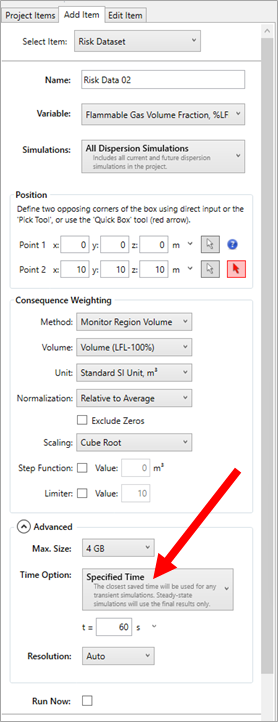
Changing Risk Dataset option for collecting data at a specified time rather than the final result
Choosing the Time Option
The Time Option tells in:Flux which point in each transient simulation's time history to use when the risk data set aggregates data across cases. Choose Specified Time and enter the time of interest for a study reporting detection within a required time; choose Final where the transient cases have been run long enough to reach a representative state and the question is simply whether the release is detected. Both options are described in full under Advanced Risk Data Set Features.
A risk data set used for a time-based analysis should contain transient simulations only. The Time Option has no effect on steady-state simulations, which use their final result regardless of the setting, so a risk data set holding both would sample the transient cases at the chosen time while the steady-state cases contribute their final result. The aggregated data would not then represent a single moment in the scenario.
Post-Processing and Optimization
Consequence weighting, risk contours and gas detector optimization all proceed exactly as described for a steady-state study. The mechanics do not change only the meaning of the result does. A risk reduction of 80% obtained from a risk data set set to a specified time of 30 seconds is a claim that 80% of the risk is detected within 30 seconds.
Because that figure depends on inputs that are not visible in the contour or the optimization report, the reporting basis should be stated explicitly in the deliverable.